NordLayer AI Scout brings prompt blocking and MCP visibility to workplace AI
NordLayer's new product combines browser prompt controls, desktop AI-use sensing and an inventory of coding-agent MCP connections. Capabilities remain vendor claims.
See the tools, then control the browser prompt
NordLayer has introduced AI Scout, a workplace AI discovery and governance product that the company says is available to organizations now. Its announced combination is a browser extension and a desktop sensor, intended to identify sanctioned and unsanctioned AI use across web and native applications.
The practical hook is prompt control before submission. NordLayer says its browser extension performs data-loss prevention on the device and can warn, redact or block sensitive information before a prompt reaches an AI service. That browser enforcement claim is distinct from the desktop sensor’s visibility into native application use; the announcement does not establish equivalent blocking for every desktop interaction.
AI Scout also addresses coding agents. The company describes a catalog of connected Model Context Protocol servers and an inventory of agent skills and capabilities, giving administrators visibility into connections beyond a conventional list of chatbot websites. The launch establishes a new product offering, while these operational capabilities are NordLayer’s claims rather than independently tested AITrending results.
Adoption and spending share the same inventory
NordLayer says the product can compare observed use with provisioned seats, distinguish active from paid licenses and estimate token spending. An estimate based on observed activity should not be read as a reconciled provider billing statement. For teams paying for overlapping AI subscriptions, the proposed workflow is to locate the tools in use, examine adoption and apply controls to risky browser submissions.
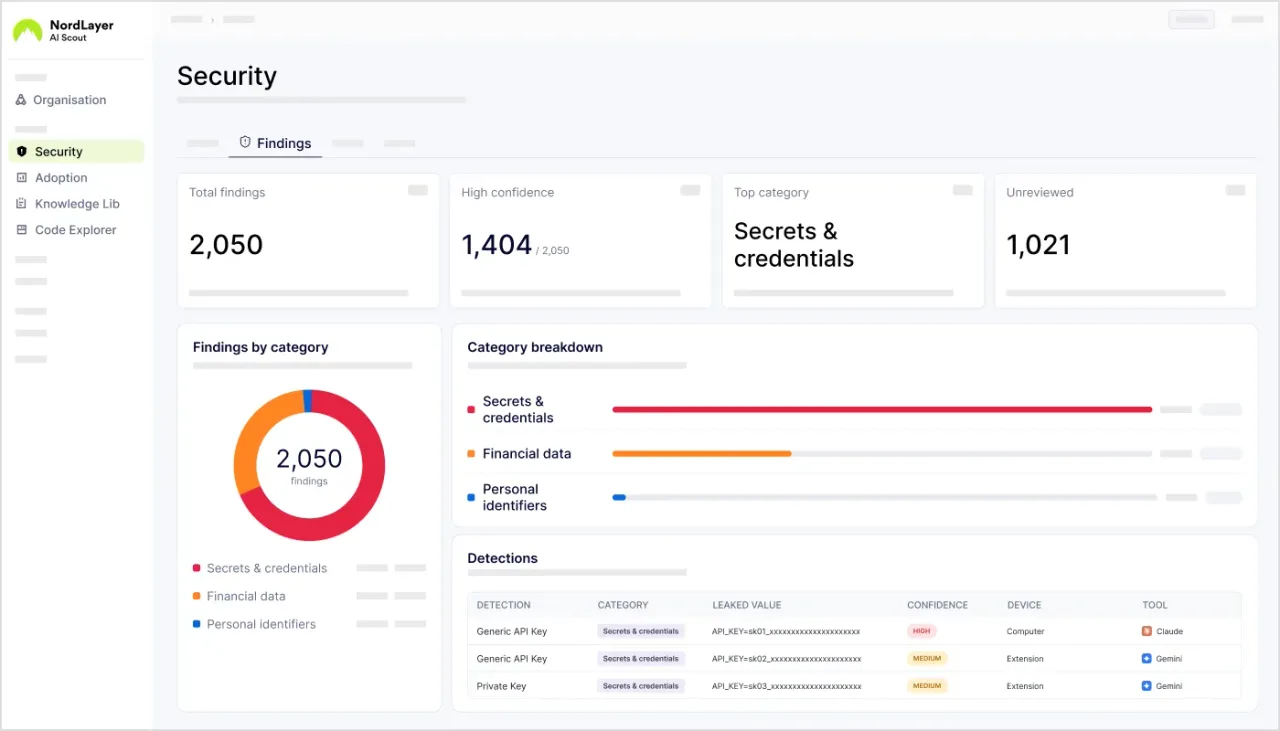
The public announcement directs interested organizations to the NordLayer team. It does not establish a fixed public price or a complete supported operating-system and browser matrix, so buyers still need those deployment details. The accompanying vendor screenshot illustrates the Security Findings interface with counts and masked examples; those fields are not evidence of actual customer leaks, independently audited detections or guaranteed prevention.