Promptise Foundry gives Python agents their own npm-style project runner
Foundry 1.4.0 adds promptise run, a project manifest and optional tracing, terminal UI and HTTP serving around ordinary Python agent programs.
A package.json-style home for Python agents
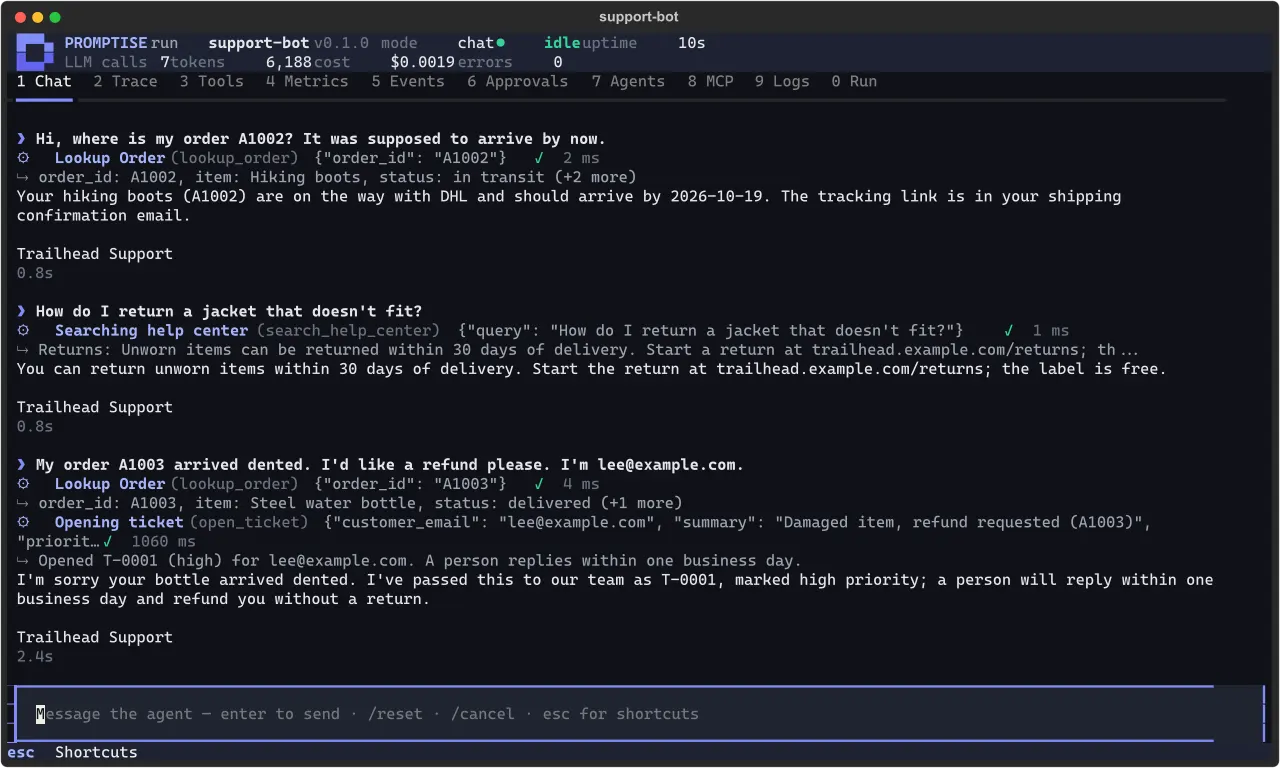
Promptise Foundry 1.4.0 introduces promptise run, giving Python agent projects a manifest and named scripts modeled on the familiar Node/npm workflow. Released on October 17, the update puts development traces, a terminal interface and HTTP serving behind flags around the same application.
A promptise.toml file, or a [tool.promptise] table in pyproject.toml, names the program, agent factory, scripts and required environment variables. The project says a plain run executes the main file as a normal Python program, preserving arguments and exit codes without adding agent instrumentation. Development flags add tracing to agents the program builds, rather than requiring separate tracing calls throughout the application.
The practical loop is promptise init --project my-bot, configure the model credentials, then promptise run --devtools or promptise run --tui. The release documents live model/tool traces, token counts and estimated costs, with prices supplied by the user’s manifest rather than a built-in price list. --watch restarts the program when project files change. The terminal UI requires an interactive terminal and cannot be combined with production mode.
A framework, with your model and permissions
Foundry is a standalone Python agent framework, not a coding-client plugin or a new model. The tagged README lists Python 3.10 through 3.13 and installation through pip install promptise. Provider strings select services such as OpenAI or Anthropic, or a local Ollama model. The generated project requires the selected provider’s API key where applicable; model-service charges remain separate from installing the framework.
Execution has real access consequences. Named scripts run through the shell from the project root, and Python programs and local tools run with the permissions available to their process. The terminal Approvals tab answers requests from agents configured with QueueApprovalHandler; its presence is not a universal approval gate for every tool or script.
For serving, promptise run --serve exposes an agent factory through invocation and streaming endpoints. The guide requires a bearer token when binding beyond loopback and describes concurrency limits and graceful draining. It also explicitly says this API serves one agent for one application: separate user identities and permissions require embedding the agent in the developer’s own server.
These are capabilities documented by the project, not an AITrending execution test. The useful change is a repeatable development and serving entry point around an existing Python agent program.
Related reading
MonoCode takes remote coding agents into systemd-free Linux containers