Coding agents are stripping ads from smart TVs, one ADB session at a time
CleanYourTV and dumbtv turn TV cleanup into a coding-agent workflow, with local debugging access, replacement launchers and important limits to restoration and compatibility.
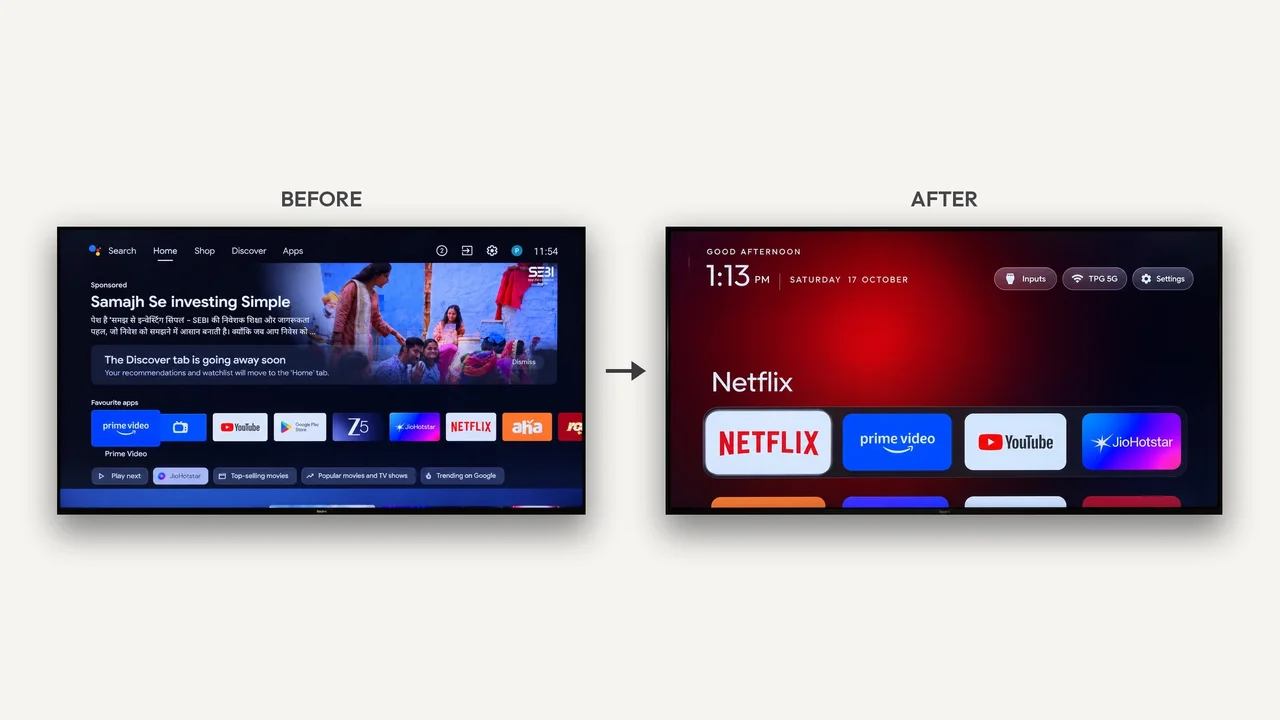
The next coding-agent project may be the television in the living room. Community projects CleanYourTV and dumbtv package a concrete workflow: connect to a TV over local Android debugging, identify unwanted packages and replace an advertising-heavy home screen. TechCrunch’s October 19 report brings together demonstrations shared over the preceding weekend, alongside reports of attempts that went wrong.
The appeal is control over the interface a buyer already owns. It is also a different use of an AI coding assistant: the assistant operates a real device through a shell, rather than merely generating a suggested configuration.
Two projects, different boundaries
CleanYourTV’s English prompt targets Android TV and Google TV. It asks users to supply their model and authorize ADB debugging, then has the assistant back up package lists and settings, ask which features to keep and disable unwanted packages in small batches. It calls for screenshots after changes and a working replacement launcher before disabling the stock home screen.
The README describes Python tools and an included native launcher. There are no prebuilt launcher binaries in that project’s documented route; users build it. Claude Code is an example host, not a required underlying model. Another coding assistant needs shell access, and users provide whatever model subscription or API access that assistant requires. These repositories do not supply free model inference.
Compatibility is narrower than a promise to clean any TV. CleanYourTV’s README offers Fire TV debloating without its launcher replacement, while its general prompt excludes Fire TV. Samsung Tizen and LG webOS are outside that Android workflow. Some sets refuse sideloaded launchers or require a manufacturer signature.
dumbtv takes a separate route, with its own Fire OS and Android TV package lists, a launcher and an optional on-device DNS filter. Its reviewed README identifies a Fire TV Edition set on Fire OS 7.7.1.7 as tested end to end; that is not independent evidence for every listed brand. Its scripts and launcher are MIT-licensed, its device catalog is CC BY-SA 4.0, and downloaded third-party components retain separate terms.
Reversible needs a closer reading
Both projects emphasize avoiding root and writes to the system partition. That does not make arbitrary package changes harmless. CleanYourTV documents a Google TV setup-wizard crash loop and restoration steps. It also recommends switching debugging off afterwards. Local debugging grants the connected computer substantial control over the TV.
dumbtv’s restoration section qualifies its broader reversible claim: streaming apps uninstalled from the data partition must be reinstalled from the store, and manual removals outside its lists are not restored. Its workflow can also disable update helpers and voice features. Those are functional changes to choose deliberately, not just a cosmetic home-screen refresh.
TechCrunch reports both enthusiastic demonstrations and users describing broken or unfinished attempts. AITrending has not reproduced these device modifications. The news is the emergence of inspectable, agent-assisted consumer-device workflows; the screenshots and authors’ claims do not establish universal safety, complete tracking removal or guaranteed speed improvements.
Related reading
AgentpitBench puts coding agents' paper-money bets and transcripts on Hugging Face