LLM Monitor puts local AI memory in your bar, then reins in runaway polling
The Omarchy plugin tracks local model VRAM and context fill; its 0.4.1 update caps model lists and follow-up requests after a marketplace review exposed a stalling scenario.
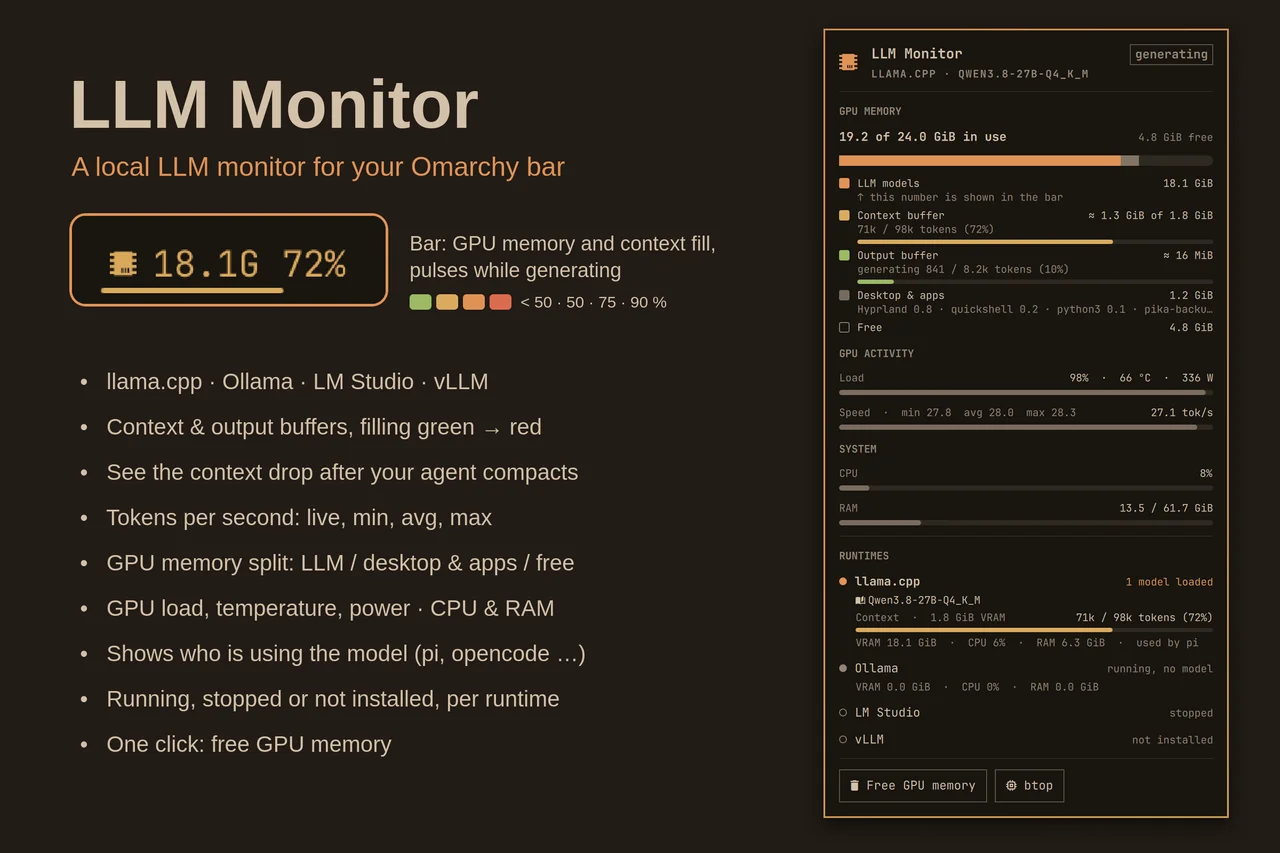
Want to see how close your local coding model is to filling its context without digging through server logs? LLM Monitor puts that information beside GPU memory in the Omarchy bar. An October 19 update also tackles a less visible problem: the monitor itself could spend far too long asking a local endpoint about advertised models.
Version 0.4.1, committed at 23:53 UTC, caps model lists at eight entries. For llama.cpp, it considers loaded, loading and sleeping models and applies a shared four-second budget before starting further slot-detail requests. A request already in flight can finish after that budget. This is a bound on follow-up scheduling, not a promise that the entire dashboard always refreshes within four seconds.
A dashboard should not get trapped by its data source
The marketplace discussion describes a scenario where another local account occupies the expected port and advertises thousands of slow-to-answer models. Per-request timeouts alone did not limit the total sequence. The upstream fix adds the shared budget, list caps for the other supported runtimes and object-shape filtering. Its regression tests simulate thousands of models; AITrending reviewed the code and discussion but did not reproduce those tests or a security audit.
For ordinary use, the MIT plugin reports on llama.cpp, Ollama, LM Studio and vLLM through local process information and localhost APIs. It shows context fill, memory allocation and available runtime statistics, including generation speed where supported. GPU metrics depend on AMD amdgpu interfaces, and context/output detail varies by runtime.
Local monitoring, with an explicit stop button
Installation uses Omarchy’s plugin add and enable commands, on a plugin-capable Quattro/Quickshell setup with Python 3. The monitor does not supply a model or need a cloud-provider key for local monitoring. It does not automatically start or reconfigure runtimes.
Its optional Free GPU memory command does change state: it stops supported user services or unloads LM Studio models, affecting every application using them. The upstream update is available, but the marketplace submission was still awaiting manual maintainer security review when checked. That distinction matters when choosing between installing upstream and waiting for the catalog process.
Related reading