Schemagate 1.9 stops MCP clients from choosing their own database roles
The community SQL-agent tool adds OAuth to its HTTP transport, taking identity and roles from signed tokens before choosing which database schema reaches a model.
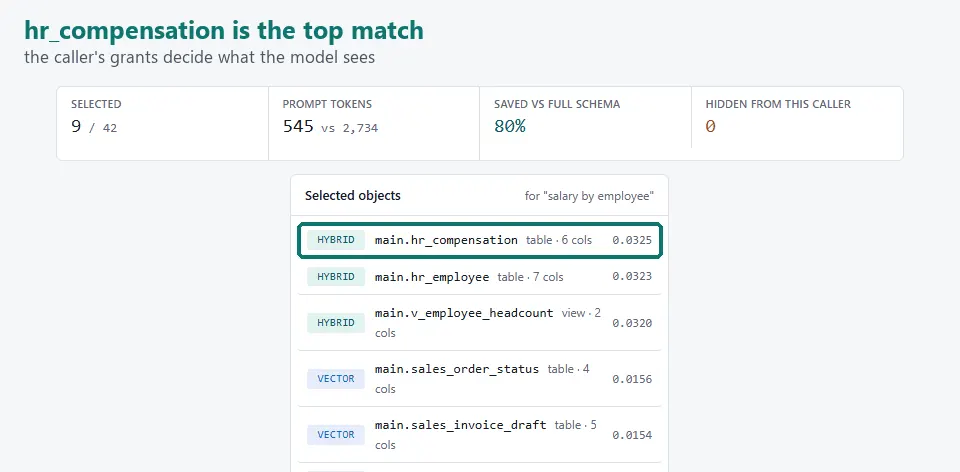
A SQL agent’s client should not get to declare that its user belongs to payroll. Schemagate 1.9.0 moves that decision to a signed identity token. The October 19 community release adds OAuth 2.1 resource-server support to the tool’s MCP HTTP transport, with a concrete change to how database permissions reach an agent.
Schemagate is a Python library and MCP server for text-to-SQL workflows, with a LangChain integration. It filters a database catalog by the caller’s grants before selecting schema for a model’s prompt. Its documented examples keep a compensation table out of an ordinary analyst’s selection and include it when the caller has the payroll role. This is schema selection for an existing agent, not a new language model or a standalone coding assistant.
A different source of identity
Without OAuth, the project’s HTTP interface trusts the client-supplied principal and roles; its documentation therefore requires an authenticating gateway, proxy or service in front of that configuration. In 1.9.0, enabling OAuth makes the server replace those arguments with the token’s subject and role claim on every tool call. A configured directory resolver can instead derive roles from the authenticated subject.
The release says the server checks JWT signatures against the identity provider’s published keys, along with issuer, audience, expiry and configured scopes. It publishes protected-resource metadata so compatible MCP clients can discover the provider. The documented integration requires JWT access tokens; opaque tokens are not supported. Clients that need dynamic registration also need a provider that offers it, or a separately registered client ID.
The author reports end-to-end tests against the real HTTP server and a local identity provider, including an attempt to request payroll access with a sales token. The version-pinned notes explicitly say these tests have not run against hosted Entra, Okta or Auth0 tenants. This reporting verifies the release and its documented behavior, not an independent security assessment.
What builders need
The Apache-2.0 package requires Python 3.10 or later. The documented MCP install is pip install 'schemagate[mcp]', adding the database-driver extra when needed, and the server can run with python -m schemagate.mcp_server. HTTP OAuth setup needs the provider’s issuer and audience, plus the public resource URL where applicable. Database access still requires the appropriate connection and grants.
The default selector works offline without a model API key. Optional model-generated descriptions and answers are separate features that need the chosen provider or local model; hosted inference may incur its own charges.
Authentication also does not make a cached catalog update instantly. By default, changed database grants reach the server when its catalog is refreshed. The documented SCHEMAGATE_CATALOG_MAX_AGE=300 setting makes it refresh an over-five-minute-old catalog before use and refuse scoped tools if that refresh fails. For shared SQL-agent deployments, the useful new capability is authenticated identity at schema selection, alongside the database’s existing access controls.
Related reading
Harness2 turns agent runs into reusable harness edits, drawing a fresh debate