MOSS-Image gets an 8.8 GB community build with a ComfyUI recipe
WaveCut's W4A8 conversion quantizes both the transformer and text encoder; the author reports a 9.4 GiB offload peak on one RTX 5090, with text-rendering tradeoffs.
A smaller route into MOSS image generation
WaveCut has published an 8.8 GB OrbitQuant W4A8 build of MOSS-Image-SFT, with a ComfyUI recipe and an author-reported offload memory peak of 9.4 GiB. The community repository and ComfyUI-OrbitQuant 0.8.0 release are dated October 16. This is a quantized deployment of an existing image model, not a new OpenMOSS model announcement.
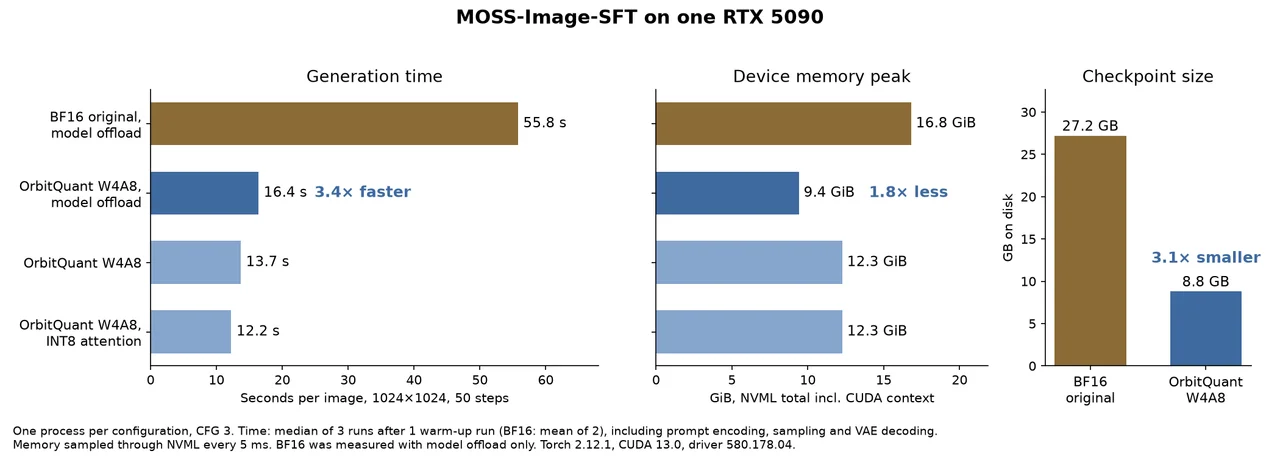
The conversion covers both the image transformer and the Qwen3.5 text encoder, using four-bit weights with eight-bit activations. Its English card compares the 8.8 GB bundle with a 27.2 GB original checkpoint. Download size and GPU memory are different quantities: the smaller file does not mean the entire generation process fits into 8.8 GB of VRAM.
On one RTX 5090, the author reports 13.7 seconds and a 12.3 GiB device peak for a 1024-by-1024 image at 50 steps and CFG 3. With model offload, those figures become 16.4 seconds and 9.4 GiB, versus 55.8 seconds and 16.8 GiB for the original BF16 model with offload. The card documents warm-up and measurement methods; AITrending has not reproduced these results, and other GPUs are explicitly untested.
CLI, Python or ComfyUI
The documented stack uses Linux, Python 3.12 and an NVIDIA GPU with compute capability 8.0 or newer. The tested environment uses Torch 2.12.1 and CUDA 13.0. After downloading the repository and installing its dependencies, users can run run_moss.py or call its load_pipeline entry point.
For ComfyUI, version 0.8.0 adds the MOSS recipe with default, model-offload and INT8-attention profiles. The instructions connect OrbitQuant Model Loader to OrbitQuant Generate Image and then a standard save node. The release specifies OrbitQuant 0.14.0, Transformers 5.20 and Diffusers 0.41 in the selected model environment. Its ComfyUI memory figures include the server and differ from the standalone measurements; the 9.4 GiB standalone number should not be promised for every ComfyUI setup.
The reduction has a quality cost. In the author’s small comparison set, Arabic and Korean text failed more often than in BF16; small text, counts and negation can also fail. This is an Apache-2.0 community conversion, and the author explicitly states that OpenMOSS did not create, endorse or validate it. Its appeal is a documented smaller local workflow, with attributed measurements and visible tradeoffs rather than a claim of lossless compression.