PigPig 3.5 turns its Discord AI into a music controller
The community bot's new release connects AI requests to playback, queues and volume, with persistent listening preferences and reminders that survive restarts.
PigPig’s latest release gives its Discord AI direct control over the music player: play, queue, volume, shuffle and removal now share a MusicService, according to the project’s English release notes. Version 3.5.0 was published October 19 at 18:39 UTC, with a practical goal of letting conversation drive a shared listening session.
The developer says the AI reports specific failure reasons instead of guessing. The update also adds request-order playback with an optional cut-in, makes the first song stream while downloading, and resumes a dropped stream from the downloaded file at the same position. Upcoming songs can be downloaded ahead of playback. These are author-described behaviors; AITrending has not run the bot.
A queue that remembers its listeners
The release describes autoplay using YouTube Mix candidates, filtering and taste-based ranking, with preferences persisted in SQLite. SoundCloud links and Spotify track links are supported through a host allow-list. The notes do not establish that a Spotify subscription’s audio is streamed directly, so link support should not be read as a promise of every service’s playback capabilities.
The player names each song’s requester, provides play-next and removal menus, and leaves an empty voice channel after 60 seconds. Reminders also survive restarts, and the AI can list and cancel a user’s own reminders. These changes connect a social AI interface to specific actions and stored state rather than adding another chat-only persona.
Running it on a server
PigPig is the Discord application; its configured language model supplies the reasoning. The English guide requires Python 3.11+, FFmpeg for music, Python packages, a Discord bot token and application credentials. It documents local model configuration and optional Anthropic, OpenAI and Gemini keys. Self-hosted software under the repository’s MIT license does not make hosting or external model usage free; the release does not supply an all-in operating price.
Server owners must authorize the bot’s Discord access. Its English privacy policy describes conversation and music-preference storage, and sharing interaction data with external AI providers for relevant features. Long-term memory can be disabled in configuration. Those deployment choices matter alongside the new music commands, especially in servers where members do not expect conversations to become persistent AI context.
Related reading
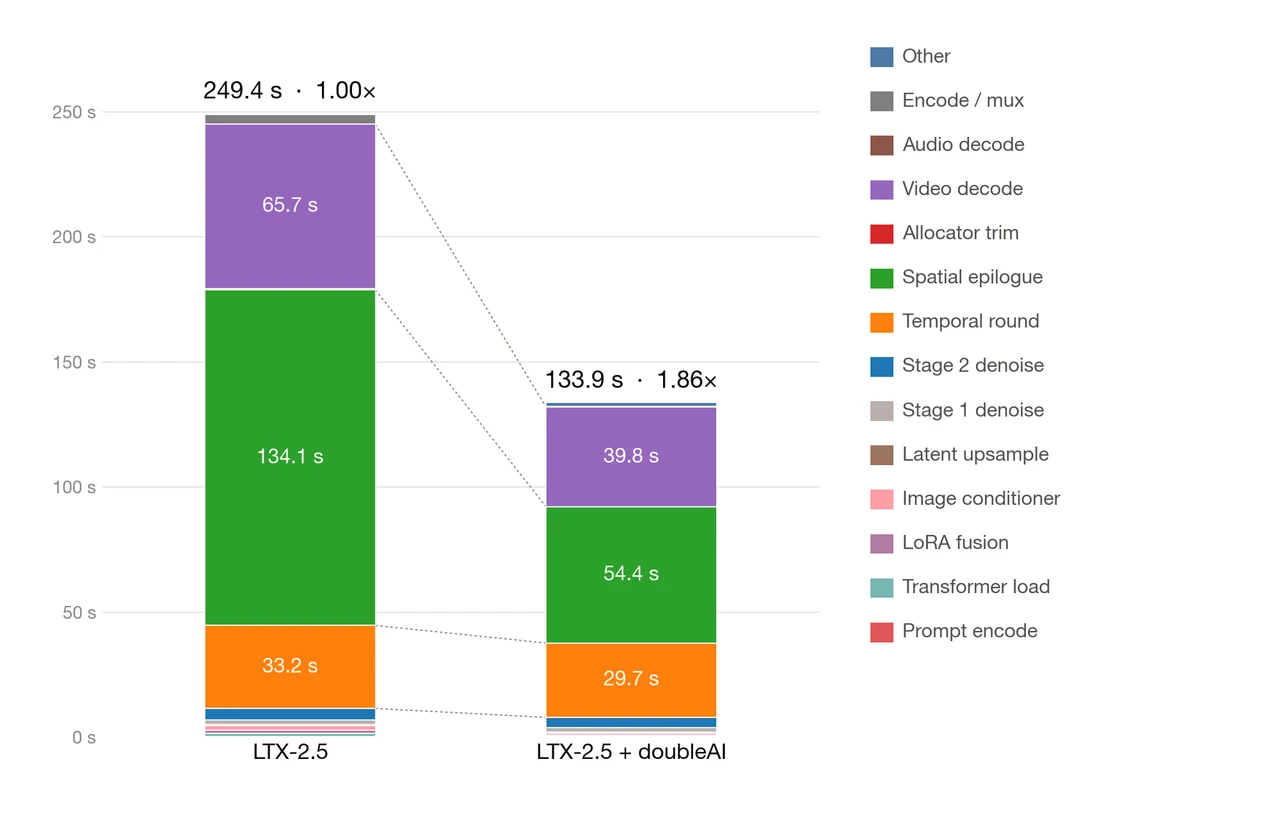
Maxwell claims nearly 2x faster LTX-2.5 video generation