Rexpad puts a coding agent’s live plan beside its terminal
The new MIT-licensed CLI and bundled skill draw a live checklist in a Rex pane, with Claude Code and Codex installation paths and same-day search and wrapping updates.
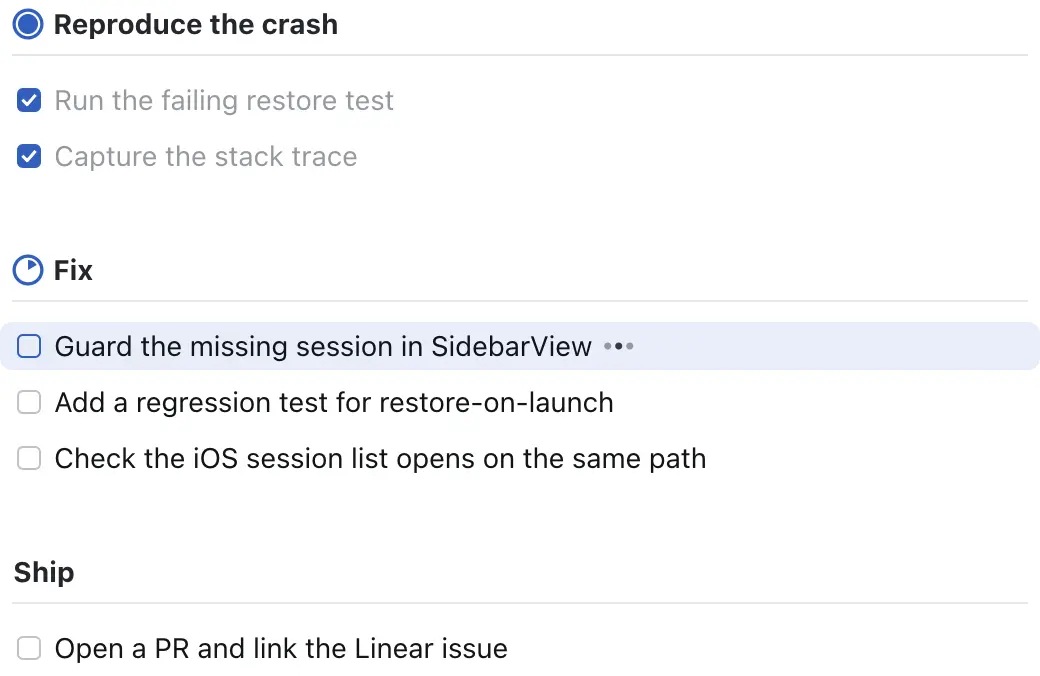
Rexpad gives a coding agent’s plan its own place on screen: a live checklist drawn in a pane beside the agent. The new community project from Alasdair Monk pairs a small command-line interface with an agent skill, so a multi-step task can stay visible without repeatedly scrolling through a chat transcript.
The November 4 initial implementation was followed the same day by fuzzy search, animated folding and long-item wrapping. Those dated commits establish recent product work. The repository has no published GitHub release in the reviewed response, so this is coverage of the current project and its documented workflow rather than a numbered release announcement.
A plan the agent keeps updating
The agent writes a Markdown checklist using pending, active and completed markers, then opens the viewer with rexpad show. Commands such as rexpad next and rexpad done move the active item and check off work. Groups get progress rings; each agent pane receives its own list by default, while an explicit list name can let agents share one.
The default automatic split takes 30% of the pane width without moving focus, according to the README. The viewer follows the active item, supports scrolling and has its own fuzzy find bar. That separate search matters because the checklist is rendered as an image through the kitty graphics protocol: the terminal’s ordinary text search cannot see the list’s text.
This is a useful recommendation for developers who want a persistent view of what an agent says it is doing. A checked box still records an agent-maintained state; it does not independently establish that code works or that a test passed. AITrending reviewed the source documentation and author screenshot without running a live Rex session or measuring productivity.
Install the CLI, then the skill
The documented binary installation is go install github.com/almonk/rexpad@latest, requiring Go 1.27 or later. A clone-and-build route is also available. Running rexpad skill install writes the bundled instructions into Claude Code’s skills directory; the README gives rexpad skill install —dir ~/.codex/skills for Codex. The skill teaches an agent when to create the plan and update it as work changes. Rexpad supplies a viewer and local checklist state, rather than an AI model or a subscription.
Automatic pane opening requires Rex on macOS or Linux. The viewer itself is documented to work in terminals supporting the kitty graphics protocol; outside Rex, list commands remain usable but the bundled skill says to skip automatic pane opening. Lists are stored locally under the user’s state directory. The documented setup does not ask for a separate rexpad API credential.
For the exact macOS appearance, the project asks for separately installed static SF Pro fonts, falling back to Inter or Go’s bundled fonts. The code carries an MIT license. Its combination of an explicit host requirement, a portable checklist format and a small agent-facing CLI makes the workflow easy to evaluate without mistaking the rendered progress display for task verification.
Related reading

Anfra lets AI-built dashboards show the rows behind a chart
Flockbook brings Herdr agent chats to Linux—and previews a phone control page